Showing posts with label Recording Tips. Show all posts

Monday, October 5, 2015

farewell to summer

You guys, as a serious blog reader for 7+ years, it always bugged me when bloggers wrote about blogging. But now, as a blogger, I understand the urge- you want to explain yourself, maybe apologize and explain the weaknesses of this platform. So I'll just say that consistent blogging is hard and I tip my hat to those that pull it off.

Ok, now that that's out of the way, let's get to the layout...

As a pocket scrapbooker, I mostly just do a weekly layouts, and for the most part, that's fine. But I wanted one page where my kids could look and remember all the fun things we did this past summer. So I used my go-to grid method and made an 8x10'' insert. On the back, I just listed the highlights of what we did.


I used Ali Edwards brush set, "So Long Summer"  


See this cute circle thing at the top? It's a brush set I stumbled upon at Pixels and Co and it's just $1 right now. 


Look at all the possibilities! It's fun, right?


Tuesday, March 3, 2015

From the Monitor to the Album - Printing Project Life at Home

I've been printing my Project Life layouts at home since I first started in January 2012. I've learned a LOT about printing photos since then and I'd love to share what I've learned. This should be useful for people who are beginners and maybe some tips for those who have already been doing this a while.

So this is what a layout looks like once I've designed all the "cards" and arranged them into my templates in Photoshop (FYI, I used to not bother laying them out in templates first- I just printed my photos and arranged them later. Either way works!):


Next, I open an 11 x 8.5" document in Photoshop and drag over one of my cards:


Now this is fine, but once I print it out, how will I know where to cut the lines? I USED to do a light gray background behind all the cards so I could see where to cut UNTIL a lovely Instagram friend shared with me a little trick. Select the layer of card you want outlined. Then click EDIT>STROKE and this box will pop up:


I add a 1 px light gray border to all of my cards. It looks like this (look closely, the line is faint!):


Then bring three more "cards" onto the document and do the same thing (you have to select the layer in the layers palette before you choose EDIT>STROKE)


I try to align the edges as much as possible to make paper cutting easier.

If you fit two 6x4 cards and two 3x4 cards onto a page, there's little waste and you just need two 8.5 x 11" pieces of photo paper per 12x12" layout.

I LOVE Costco Kirkland's Photo Paper and here's the post about where I buy printer ink for cheap.

Let me know if you have any questions or other methods of printing cards! I'm curious to hear how you do things!

Monday, November 10, 2014

Recording Kids' Quotes

For the last 18 months, I've been using a delightful little app called KidQuoter to record the hilarious things my now 4.5 year old says. Since I've started using this app, I've recorded 120 quotes! I've told nearly all my friends and family about this great app because I found that I was actually consistently using it!


BUT...my phone just broke last week and as I was trying to re-download the app again on my new phone, it became apparent that that app is no longer available for new download. And there was no backup system!!! (I even contacted the company that made the app!) Luckily my husband fixed the old phone enough for me to type all of the quotes that had been recorded! So now, I've got a word document full of quotes, phew!

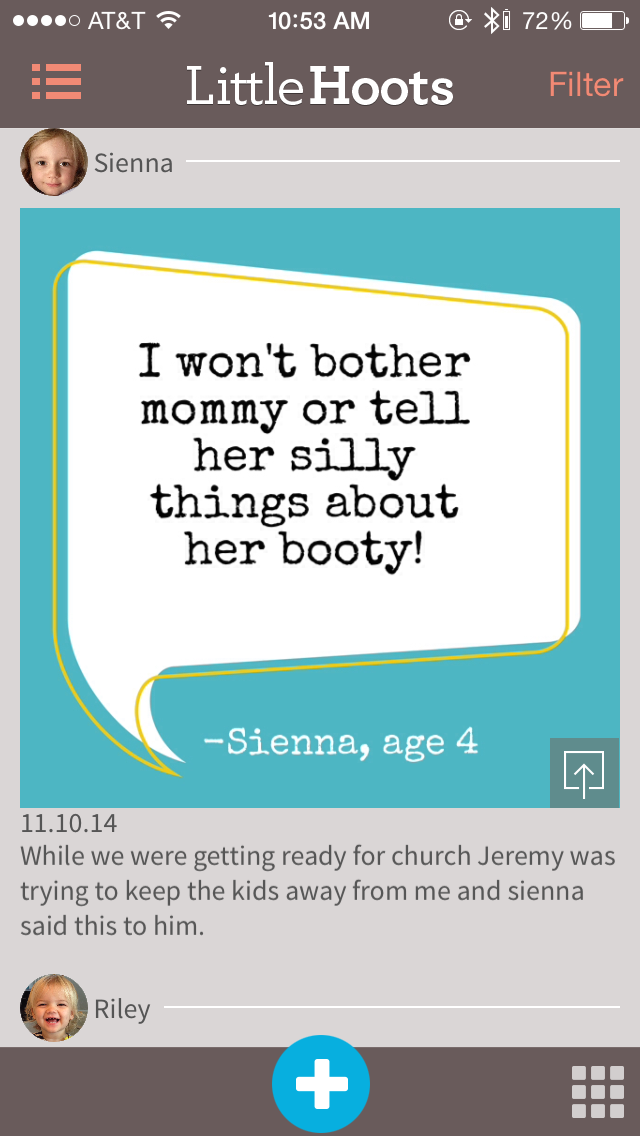
I was on the hunt for a new app that does the same thing and I found a great (better!?) alternative: Little Hoots!

I just started using it, but this free app (with optional in-app purchases) is visually way better. And it adds some features that I wish KidQuoter had. Like, when you add a quote, it gives you the option of single quote OR conversation. I LOVE this! SO many times, the best quotes are from conversations I have with the kids and now I can document this! Also, it allows you to record little notes under the quote to give it context, location, etc. They also have much cuter designs AND the option to add pictures next to the quote. So great! There's definitely more options which makes it slightly less simple than my old app, but it's so pretty and has great features so I'll be using this from now on! Excited to keep recording the funny things my kids (and husband!) says!


And finally, each quote you enter has the option of being shared via Tweet, Facebook, text or email! Yay! You can also have all of them save to your Camera Roll so you can include them in your Project Life albums! Wouldn't this make a great mini book? I think that's what I'll do with the 18 months of quotes.


What do you guys think? How do you record your kids' sayings?

*not affiliated, just like sharing good products!

Friday, October 31, 2014

How to Record your Gym Life without Obnoxious Selfies

In March of this year I joined a gym and started spending a lot of time there. Soon I started a strict diet and felt like I spent so much time thinking/talking/researching and working on my health. I knew I had to include these changes into my Project Life album but I didn't want the album to fill up with obnoxious, posed gym selfies. So I got creative. Here's what I've come up with over the months:

1. Mock the Selfie - My husband and I were working out together one day and I thought, why not just join in on the selfie fun. So we flexed, made stupid faces and I added some tongue-in-cheek hashtags over the picture to make it clear we were not taking ourselves seriously.


2. Equipment - One of the classes at the gym is called "Tight Assets" and at the beginning of every class you gather up various equipment. I saw the pile of stuff and thought, hey, there's a photo opportunity. Bam. It made it in the album.


Another one of my favorite gym shots (below) is a machine at the gym I was on. I spotted some symmetry and I am just a sucker for symmetry so snap. Got it.


3. Meals - This one is pretty common on Instagram- there are so many healthy eating accounts and they make their food look extra pretty. If there's a healthy meal you eat over and over, take a minute one day and "style" the shot and include that in your spread. Smoothie pictures are really pretty, too!


4. Self-Timer - Just last week I was trying to come up with more creative ways to document my gym time and since the self-time feature in the newest iPhone software update is pretty handy, I snapped a few while I was doing some "mat work." Just propped the phone up on something that was already on the ground and snap! This one is great for a little action shot!


5. The Subtle Selfie - I am guilty of the gym selfie, but the ones I've done have been subtle. These are ok, right? ;-)


Any other good ideas to document your gym/fitness time?

Thursday, October 16, 2014

Recording Meaningful Passages

The only 2014 resolution I've stuck with is to read more books this year. I know it's vague wording, but I just started my 48th book (but who's counting?) so I'm considering this a success. I think I can hit 55 by the end of the year if I work hard neglecting my kids. ;-)


I bought a notebook when I was roughly 11 years old that was really special to me as I started writing down quotes that I heard in church, read in books, etc. I've kept that tradition for many years and although my 27 year old self would rather have a different notebook, I'm sticking with the one that spoke to my 11 year old self. I'm surprised how often I look through this notebook looking for some kind of inspiration, something to make me smile or just motivation to be a better human. Knowing that everything in this notebook impacted me at some point in my life over the last 16 years makes it one of my most treasured items.


Here's one tip I've picked up along the way that helps me record the meaningful passages in the books I've read.

99% of the time, I'm reading a book from the library. Since I can't highlight or write in the margins (or copy and paste), this is what I do: when I come across a passage that is meaningful or even just a well-written passage, I dog-ear the BOTTOM corner of the page that the quote is on (sorry, library!). Then, once I've finished the book, I take about 10-15 minutes to go through the pages I've dog-eared and find the quote that meant something to me and transcribe it into my notebook.

Some books I don't dog-ear anything. Some books I'm dog-earing nearly every page! (hello, Brene Brown!) There's no pressure to fill up the notebook or make sure every book has something meaningful. Some books are just fluff and that is OK.

Someday I may turn this notebook into something else like a blurb book. But for now, I like my old school notebook. And I love seeing how my handwriting has evolved! (Thanks to computers and iPhones, I'm afraid it's getting worse at a fast rate!)

If you're curious, the books that have the most quotes written down in my notebook (and, therefore have probably impacted me the most):

  • Gift from the Sea, Anne Morrow Lindbergh
  • Carry On Warrior: Thoughts on Life Unarmed, Glennon Doyle Melton
  • Daring Greatly, Brene Brown
  • A Million Miles in a Thousand Years, Donald Miller
  • The Tenant of Wildfell Hall, Anne Bronte
  • East of Eden, John Steinbeck
  • Jane Eyre, Charlotte Bronte